How to Deprecate Dead Workflows Without Breaking Live Campaigns
Classify workflows before you pause them, or watch live campaigns break.
What "dead" actually means and why the classification matters before anything else
Deprecating a dead workflow is rarely the problem. Turning it off without breaking three live campaigns that quietly depend on it, that's the actual work. The gap between "we know this is dead" and "we've safely shut it down" is where most campaigns break, and that gap exists because teams treat deprecation as one decision instead of a sequence of them.
Dead workflows don't announce their death. They degrade: a trigger misfires once a quarter, a segment stops updating and nobody checks it, an automation sits there with no clear owner and no one willing to touch it for fear of what might snap. Most teams get this wrong in one of two directions. They either delete too fast and wipe out something that still feeds a report three departments pull from every Monday, or they never delete at all, letting orphaned logic pile up because pulling the plug feels riskier than leaving it alone. Both instincts are wrong, and the second one is worse, because it disguises itself as caution. Salesforce's own retirement of Workflow Rules and Process Builder, with end-of-support effective December 31, 2025, forced this exact reckoning on thousands of orgs at once: audit, classify, retire, all under a deadline, all while campaigns kept running in the background underneath it. What follows is the sequence that makes that possible without collateral damage.
Not every automation labeled "dead" is actually dead, and treating them all the same is how the wrong thing gets deleted. Three distinct states usually hide under that one word, and mixing them up is the single most common cause of a bad deletion.
Truly inactive workflows show zero executions over a meaningful lookback window, have no owner, and touch nothing downstream. These are safe to kill. Dormant but scheduled workflows look inactive on the surface but are tied to a seasonal trigger, a Q4 promotion, an annual renewal cycle, something that hasn't fired recently only because its moment hasn't come yet. Delete one of these in July and it won't hurt anyone until November, when it will, and by then nobody remembers it was ever touched.
Then there's the zombie: actively executing, consuming resources, generating log entries, but producing no measurable business outcome. Zombies are the hardest category to kill precisely because they look alive. Somebody's name is in the owner field, even if that person hasn't looked at the workflow in a year, and that's exactly who shows up to defend it on instinct rather than evidence the moment its removal comes up.
Segmentation debt compounds all of this. Most marketing organizations build audience groups for individual campaigns, one-off webinars, product launches that closed out months ago, and rarely retire the segment once the campaign ends. Each one of those groups is a latent dependency that becomes visible the moment someone tries to clean house. Audits across marketing automation environments commonly find that something in the range of 30 to 40% of documented audiences sit inactive or redundant. That's the baseline condition most environments are already sitting in, whether anyone's checked or not.
The triage principle follows straight from classification. Workflows with negligible execution and negligible value get deprecated outright, no replacement required. Workflows still delivering value get migrated, on a timeline, with care taken at each step. Classification decides the path. The tool used to walk that path is a secondary question, and teams that argue about tooling before they've finished classifying are solving the wrong problem first.
The audit phase covers what to look at, in what order, and what tools surface it.
Skipping the audit is the fastest way to break something live. Order matters here, not because process is sacred for its own sake, but because acting before the terrain is mapped is how a "dead" workflow turns out to feed a report the finance team pulls every Monday morning.
Start with scope, and scope by object or business process, not by team or tool. A team-based inventory misses cross-team dependencies almost by design: no single team has visibility into what another team quietly built on top of their automation. Within Salesforce environments, Tools like Org Check and third-party options like Elements.cloud exist specifically to surface where deprecated features are still active in a given org. They're the documented toolset built for exactly this job, and skipping them in favor of a spreadsheet somebody's maintaining by hand is how things get missed.
Every automation needs its logic traced end to end before anyone classifies it. Undocumented branching, an if/then buried three layers deep that nobody wrote down, is where assumptions about what's "dead" go wrong most often. Pull actual execution counts over a defined lookback window, at minimum 90 days, longer if the workflow has any seasonal shape to it at all. Self-reported usage, the "nobody uses this anymore, I'm pretty sure" kind, is a guess wearing a data costume.
For every workflow flagged as a candidate, map what it feeds: downstream automations, reports, segments, integrations. At scale, this can mean spinning up child audit projects organized by stakeholder group or product line, since migration priorities and timelines differ across groups even when the underlying process is identical. What can't differ is communication. Siloed audits produce siloed decisions, and siloed decisions are how one team retires something another team was quietly depending on.
The audit phase ends with one document, not a running conversation in a messaging app: a full inventory, each workflow classified, its execution history attached, its owner named or explicitly marked unowned, and its downstream dependencies listed out. Nothing moves to the next phase without that document in hand.
Isolating candidates from live campaigns before touching anything
Isolation is the step most teams skip entirely, jumping straight from "this is dead" to "delete it." That jump is where live campaigns break, because the workflow that looked safe on paper was still, in practice, feeding something nobody thought to check.
The principle is straightforward: a candidate workflow needs to be fully separated from any live campaign's dependency chain before retirement, not at the same time as it. In practice that means a handful of concrete moves. Pause the workflow rather than deleting it outright, and watch it in that paused state for a defined window before anything becomes permanent. Pull the candidate out of any active segment memberships or trigger chains touching live campaigns. Redirect downstream dependencies to their replacement logic before retirement, not after, so nothing is left pointing at a workflow that no longer exists. And document the isolation state clearly enough that a colleague doesn't stumble across a paused workflow, assume it broke by accident, and flip it back on mid-window.
The monitoring window itself should track the workflow's normal firing cadence. If it fires weekly, a two-week silence tells you less than a six-week one does. If nothing breaks and no stakeholder flags a missing output across that window, the workflow is genuinely safe to retire.
Meta's approach to deprecating legacy campaign APIs illustrates the same principle at platform scale. The gap between version 24.0, released October 8, 2025, and version 25.0, released February 18, 2026, exists precisely to give developers room to isolate and test before the hard cutoff lands. Nobody gets flipped over instantly, and that gap isn't generosity, it's the minimum runway the isolation step actually requires. For organizations running two platforms at once during a migration, isolation carries an added requirement: each live campaign needs one clearly labeled system of record. Without that, both platforms can end up triggering the same audience, and now the campaign has a duplication problem instead of a deprecation one.
The retirement sequence: why the order isn't arbitrary
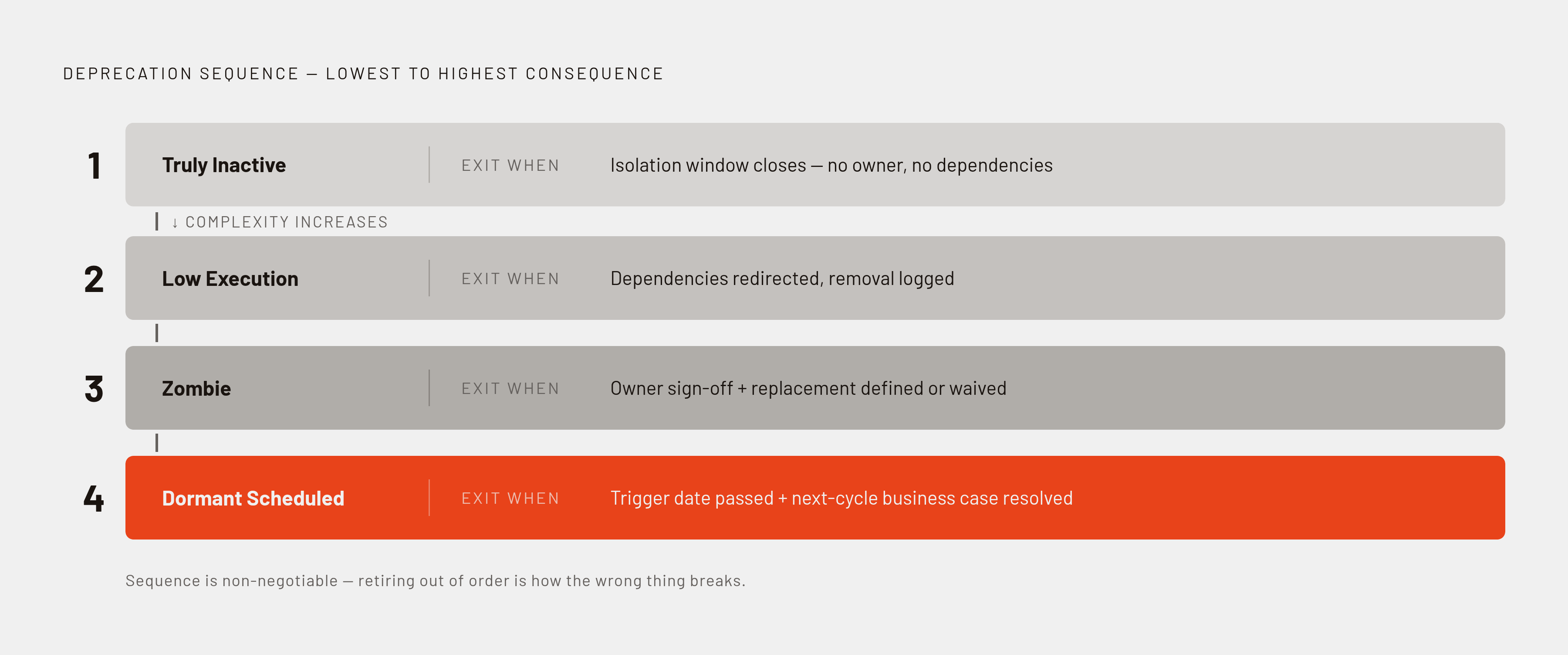
Retire the simple, low-impact automations first, then work up toward the complex and business-critical ones. Stakeholder pressure will often push the opposite direction, toward tackling the "big" workflow everyone's worried about first, but that instinct is backwards and should be resisted directly. Retiring the small stuff first builds a documented track record, stress-tests the retirement process itself against low stakes, and gives the team confidence with the tooling before complexity and consequence both climb.
Four tiers, in order. Truly inactive workflows with no dependencies and no owner fall into Tier 1: retire these directly once the isolation window closes, no replacement necessary. Low-execution workflows with minor dependencies fall under Tier 2, retired once those dependencies are redirected and the removal logged for the audit trail. Tier 3 is the zombie category, actively firing but producing nothing of value, and these require explicit owner sign-off along with either a defined replacement or a clear, recorded decision that no replacement is needed. Tier 4 holds dormant but scheduled workflows until the relevant trigger date has passed and the business case for the next cycle has been confirmed or denied.
Salesforce's Migrate to Flow tool is a useful real-world illustration of sequenced, platform-supported migration, and it is not a one-click button no matter how it's marketed. Organizations still have to put in real time on planning, testing, and validation, particularly in environments where the old logic has branched in ways nobody fully documented at the time.
Retirement is also the natural moment to ask a harder question: can several workflows collapse into one simpler workflow, or into an out-of-the-box platform feature that needs no custom automation at all? Salesforce Functions was retired January 31, 2025. Low adoption made that retirement clean and largely uneventful. Compare that to Workflow Rules and Process Builder, where broad, years-deep adoption made a careful sequence not optional but essential to getting through it without breaking things. Retirement isn't finished the moment something's switched off, either. Every retired workflow needs a logged record: what it did, when it was retired, who signed off, and what, if anything, replaced it.
How to structure human coordination so it doesn't break the process
Getting the technical sequence right matters, but it isn't sufficient on its own. Most deprecation failures trace back to coordination breakdowns, not tooling failures. The fix has to be structural rather than technical.
Ownership sits at the center of the problem. A workflow with no clear owner tends to never get retired, simply because no one holds the authority to make that call and nobody wants to be the person who made it without asking. The audit phase has to produce an owner assignment for every single candidate, even when that assignment is explicitly "no one, retire without replacement." Leaving the owner field blank is how a workflow survives five more years past its usefulness.
Cross-team dependency conflict is the other recurring failure. A workflow one team has written off as dead may be quietly feeding a report or segment another team checks every week without fail. Without shared visibility across teams, the team doing the deprecating has no way to know that, and won't find out until the report breaks and someone comes asking why.
The fix isn't complicated, but it has to be deliberate about a few specific things. A centralized deprecation log, visible across every affected team rather than buried in one team's internal project tool. A defined review window where stakeholders flag dependencies before isolation starts, not after the workflow's already paused. Explicit, timestamped sign-off required for anything sitting in Tier 3 or Tier 4. For organizations carrying heavy legacy automation, child projects organized by product line or stakeholder group can help manage the scale, so long as the channels between those groups stay genuinely open rather than nominal.
Training is easy to underweight here, and it shouldn't be. Salesforce is explicit that admin and development teams need Flow training before migrating off Workflow Rules and Process Builder. Deprecating the old system without building the new capability doesn't clear the backlog, it relocates it, and often makes it worse, because now there's unfamiliar tooling stacked on top of the same unresolved logic nobody understood in the first place. The two failure modes are opposite ends of the same problem: moving too fast and deleting before dependencies are actually cleared, or moving too slow and leaving candidates stuck in indefinite "paused" limbo because nobody will sign off on the final step.
Stale automation and stale content: the same underlying problem, and the same fix
Dead workflows in a martech stack and stale content sitting in a brand's digital presence are, structurally, the same problem wearing different clothes. Both are accumulated signals that were once accurate, are no longer accurate or active, and are still being read and acted on by systems with no way of knowing the difference.
AI systems, including large language models like ChatGPT, Gemini, and Perplexity, assess a brand at the moment of a query based on whatever signals are available to them, whether from training data or, where applicable, real-time retrieval. Stale, contradictory, or orphaned content doesn't just sit there quietly waiting to be cleaned up. It actively shapes how those systems represent the brand to whoever's asking. Research has found that recently updated content appears 4.3 times more often in AI answers than stale content does, and that 85% of AI Overview citations come from content published within the prior two years, with 44% from 2025 alone. Leaving dead content in place is a present, active risk, not a future one. It already shapes which brands get cited and which don't.
There's a delay built into fixing this too, and it deserves to be named: the fix does not take effect until the next retraining cycle. Pulling stale content from its original source doesn't immediately change how a model that already trained on that content will answer a query. Major models tend to retrain on a cycle of somewhere around 12 to 18 months. Cleanup therefore has a long tail: the fix takes hold first, and only much later, once models retrain, does its effect become visible.
Apply the same discipline one layer over. Audit, classify, isolate, retire, whether the object in question is a workflow or a piece of content, and the same monitoring window applies for the same underlying reason: the effect of cleanup doesn't arrive instantly in either domain. It's the same process, run against a different kind of signal, inside the same operational environment.
Measuring whether deprecation worked: the signals that confirm the process held
Deprecation finishes once a verification window has passed and nothing broke, once the switch gets flipped.
After each retirement tier closes, a few things need active checking, not passive assumption that everything's fine. Live campaign performance metrics deserve a close look for anything unexpected, such as a drop in send volume, a shift in trigger rates, or a segment membership count that changed without explanation. Any of these can point to a dependency the audit missed. Downstream reports and dashboards that pulled from a retired automation need to be checked explicitly rather than trusted to update cleanly on their own, because they often don't. And stakeholder silence confirms nothing on its own. Teams that flagged a dependency during the audit phase deserve an actual follow-up check-in, because assuming no news means no problem is exactly the kind of shortcut that causes the next break.
Salesforce's retirement of Maintenance Plan Frequency Fields is a clear example of this in practice. Effective October 1, 2025, it meant anything relying on those fields had to be identified and verified both before and after the retirement date. The retirement date marked the start of verification, before the project could be considered complete. The same held for the Summer '25 API version deprecation in June 2025, which retired versions 21.0 through 30.0 and required regression testing to confirm nothing had quietly broken downstream. The same logic carries over to internal workflow retirement: test before declaring the thing closed, never after.
The sustainable posture here is a recurring practice, ideally a quarterly audit cadence for any actively used environment, because segmentation debt and zombie automations don't accumulate in discrete events. They build up continuously, in the background, every time a campaign launches and its segment never gets cleaned up once the campaign ends. Platforms that track the full signal environment, across algorithmic, automated, and human-facing dimensions, give teams a persistent read on whether operational cleanup is actually changing how the brand gets evaluated, rather than just how tidy the internal dashboard looks. Measurement has to start before the improvement effort begins, and it has to keep running long after that effort ends.