Trigger Logic Design for Behavioral Email Sequences
Behavioral triggers outperform broadcast campaigns by 3x when logic design includes exit conditions.
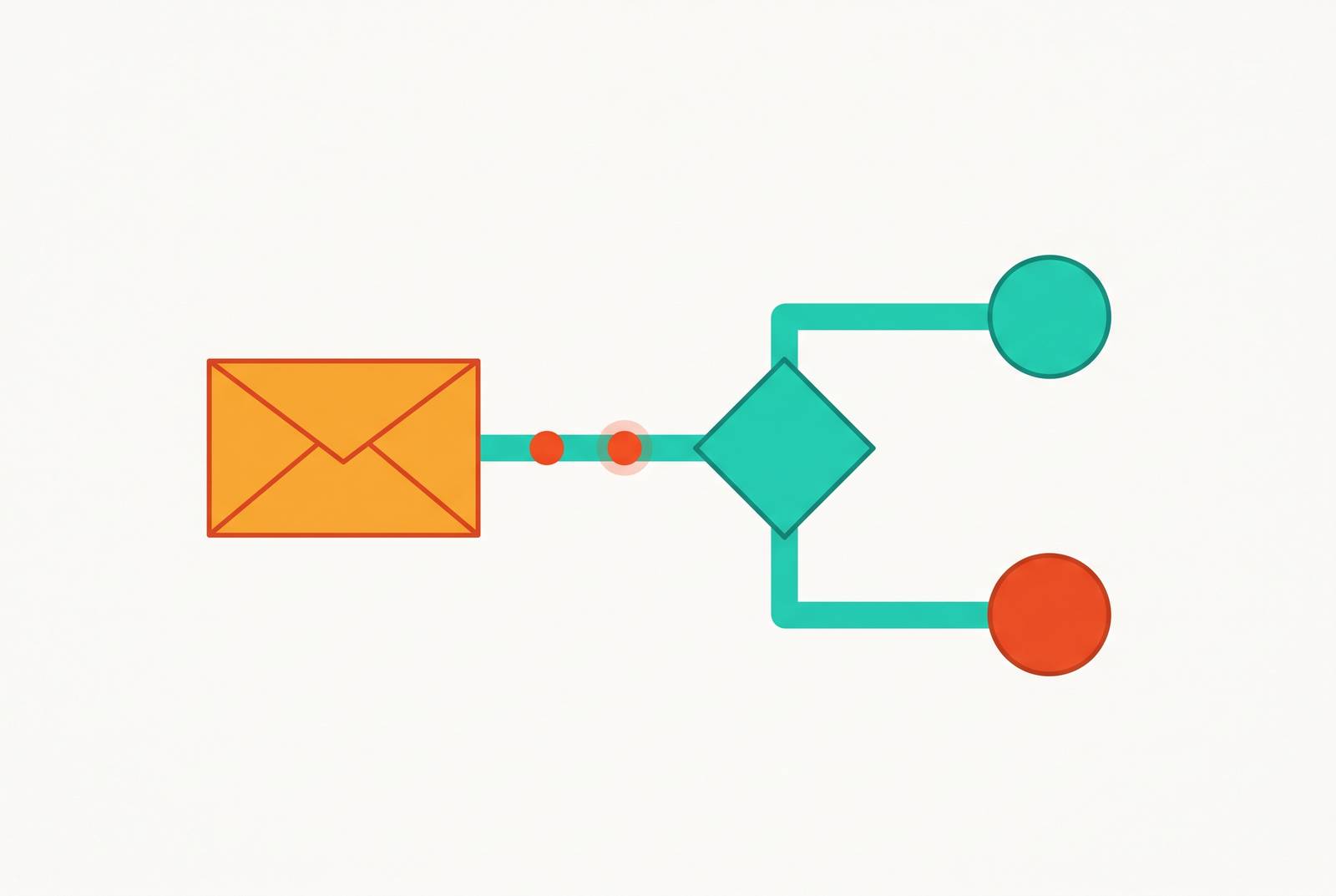
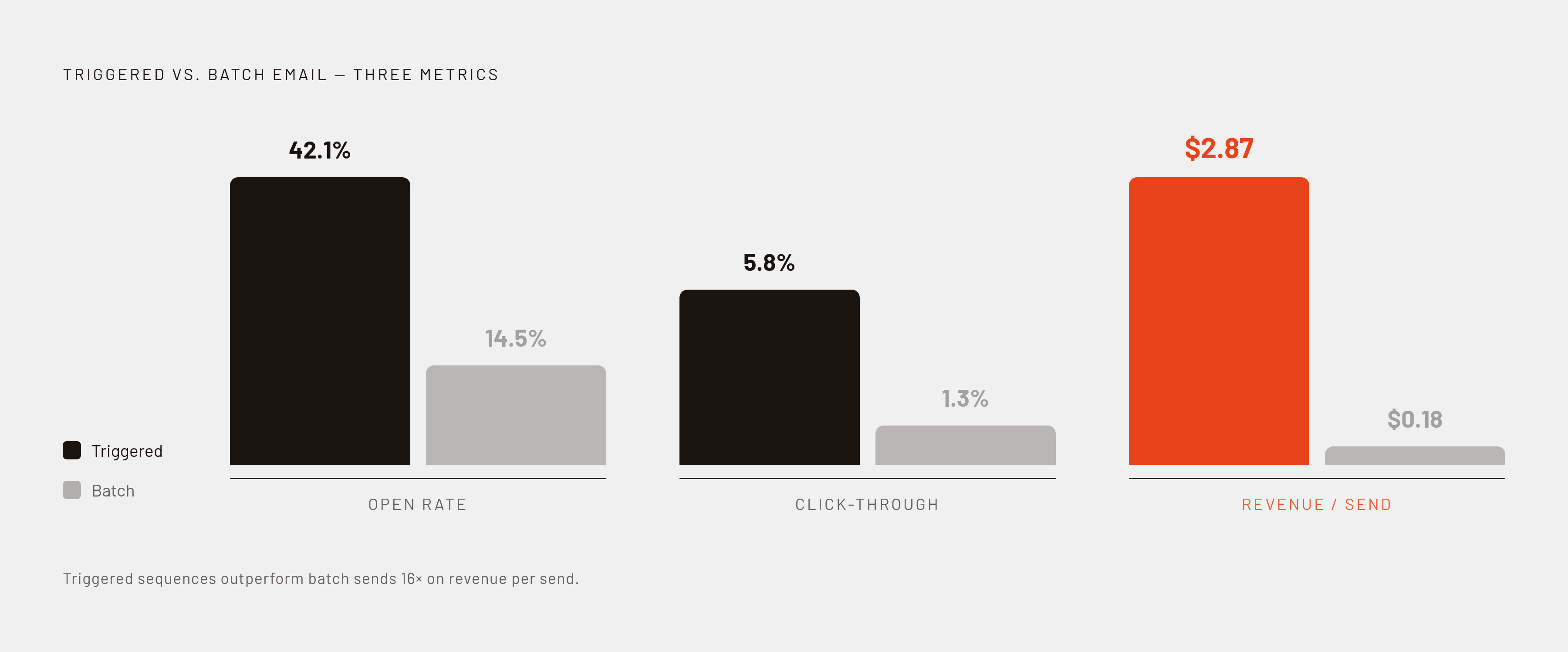
Behavioral email sequences beat broadcast campaigns by a wide margin, and the gap has nothing to do with which platform sends the mail. It comes down to logic design. Industry benchmark data puts batch-and-blast campaigns at a 14.5% open rate and 1.3% click-through rate, against 42.1% and 5.8% for behaviorally triggered sequences. Revenue per send tells the same story: that same Omnisend data via DesignRush's report shows automated emails generate $2.87 per send versus $0.18 for scheduled campaigns. At 100,000 sends, a $2.69 gap per send is the difference between a marketing line item and a revenue channel, and DesignRush's Benchmark Survey found that 83% of email marketers already use behavioral triggers in some form. So the gap isn't a secret. Someone who clicked through to pricing gets pulled forward into a conversion-focused message, skipping whatever step would have come next by default.
The four building blocks that every behavioral sequence is made of
Every behavioral sequence, regardless of industry or platform, is built from four components: triggers that start the sequence, timing rules that govern delays between sends, conditional logic that branches based on subscriber behavior after each send, and exit conditions that stop the sequence once its goal has been met.
Most teams spend nearly all their attention on the first two. Both need equal design attention, because treating the failure case as an afterthought lets dead addresses keep dragging down sender reputation. That's backwards, and it's exactly where sequences fail in production.
A sequence without exit conditions is a scheduled list wearing conditional logic as a costume. It has no awareness of its own outcome, and that's the real line between a drip campaign and a behavioral sequence. A drip sends Email 1 on Day 1 and Email 2 on Day 3, no matter what the subscriber did in between. A behavioral sequence sends Email 2 only if Email 1 produced a specific result, and sends something different, or nothing at all, if it didn't. That distinction has nothing to do with whose logo sits on the dashboard. It's an architecture decision, and it has to get made before anyone opens a platform.
Three trigger types, and why inactivity is the one most teams get wrong
Nearly every real-world sequence runs on some combination of three trigger types, plus a fourth that appears only in more mature setups.
Action triggers fire when a specific event happens: a signup, a purchase, a feature use, a visit to the pricing page. These are the easiest to build, since the platform just listens for an event and responds.
Inactivity triggers fire when an event has not happened within a defined window: no login in seven days, no activation completed within 24 hours. This is a fundamentally different kind of detection, because the system has to actively scan for absence instead of waiting for a signal to arrive. That distinction trips up more platforms than marketers expect, and the direct issue to raise with any vendor before committing to a build is how the system detects something that never happened.
Threshold triggers fire when a cumulative attribute crosses a set value: a usage limit reached, a trial 80% elapsed. These require tracking state over time rather than reacting to a single event, which is a heavier lift than most teams budget for.
A fourth category, pattern triggers, combines multiple behavioral signals over time, such as repeated visits to a key page paired with no downstream action. This is generally considered the most sophisticated trigger type, and few platforms support it natively. A SaaS user who checks pricing three times in a week without upgrading is generating a compound behavioral pattern, and catching it requires a platform that holds state across events instead of reacting to whichever one just happened.
Inactivity triggers are the ones teams get wrong most often, and the fix is not to choose between calendar-based and event-based logic. It's to combine them. The reason is straightforward: a user who signs up and doesn't log in for 48 hours is a genuinely different sequence candidate than one who's been active daily since signup. Sending both the same Day 3 email is wrong for at least one of them, possibly both. Sequenzy recommends behavioral triggers for core actions, with time-based fallbacks built in for users who never generate the event the sequence is waiting on. A pure calendar system misses the behavioral signal. A pure event-listener never fires for the user who simply goes quiet.
Exit conditions: the most skipped design step, and its cost to conversions
Exit conditions are widely recognized as the most commonly skipped part of sequence design, and it isn't close. Teams pour effort into defining exactly when a sequence should start and barely think about when it should stop. That gap produces one specific, embarrassing, entirely preventable failure: emailing a customer who already upgraded.
Exit conditions have to cover more ground than "did they convert." Goal completion is the obvious case: a subscriber purchases or activates, and the nurture sequence needs to end immediately, not at the next scheduled send. Competing sequence priority matters just as much. A dunning email about a failed payment should always override a feature tip if both are eligible to fire the same day, and without suppression logic and a priority order, subscribers get contradictory messages in the same inbox on the same morning. Then there's re-entry logic, which people forget entirely: some platforms let a subscriber loop back into an earlier stage if they finish the whole sequence without converting. That behavior doesn't happen by default. It has to be built on purpose, or it doesn't exist.
Here's the technical constraint that makes this hard. Standard marketing automation tools generally work off pre-imported lists and scheduled broadcasts, with no live connection to user state at the moment of send. A user who upgrades an hour before a scheduled email fires still gets that email unless the platform checks state in real time through a live data connector, MailerToGo's research shows. That's a constraint an architect has to design around from the start, the same way an engineer plans for network latency instead of pretending it away. It's a constraint an architect has to design around from the start, the same way an engineer plans for network latency instead of pretending it away.
The rule, as stated on mailadept.com, is to define the exit condition before writing a single word of the sequence. Know what success looks like before the first email gets written, not after the fifth one is already scheduled to go out.
Server-side events don't have that failure mode, because they don't depend on what's running in the user's browser.
A contact who clicks through to the pricing page should get a different next email than a contact who opened and did nothing. That single distinction is why automation stops functioning as a fancier broadcast list: branching logic makes it personalization instead.
Without branches, a sequence has exactly one path, and every subscriber walks it whether it fits them or not. With branches, the sequence becomes a tree of conditional decisions, each one routing a subscriber according to what that subscriber actually did. A subscriber who opened but didn't click gets a re-send with a different subject line, or educational content instead of another pitch. Someone who clicked through to pricing gets pulled forward into a conversion-focused message, skipping whatever step would have come next by default. Someone who completed activation gets pulled out of the activation nudges entirely and dropped into a milestone flow. Someone who hit a usage limit gets an upgrade prompt the moment that limit trips.
MailerToGo's resources frame SaaS onboarding around three audience states that drive most of this branching: the new sign-up who's registered but hasn't activated, the activated user who's hit a key milestone, and the inactive user who registered more than 24 hours ago with no activation event logged. Each state needs its own branch. Sending the same message to all three treats a real behavioral difference as if it were noise.
Branching also governs what happens at the end of a full sequence. Looping a non-converting subscriber back to an earlier stage with modified messaging is a legitimate structural choice, but it has to be a choice made at design time, not something the platform quietly does by default. The practical fix is almost embarrassingly simple: sketch the sequence as a flowchart on paper before opening any tool's visual builder. Logic drawn by hand tends to be more complete, and far easier to audit, than logic assembled step by step inside a drag-and-drop interface, where it's easy to build a branch and forget to close it.
Timing and suppression decisions that most sequence designs leave implicit
Timing looks like a single question, how many days between emails, when it's actually several questions stacked on top of each other: delay type (immediate, fixed delay, or event-relative), quiet hours, frequency caps, and priority ordering across sequences running at the same time.
Different triggers call for genuinely different delays, and the differences aren't arbitrary. A payment failure calls for a very fast response, because urgency and consequence make delay costly. Cart abandonment works best on a short delay: long enough to be confident the shopping session has actually ended, short enough that purchase intent hasn't cooled. An onboarding stall calls for something slower, around 48 hours, giving the user a real chance to come back on their own before a nudge appears in the inbox.
The data on welcome email timing is unusually sharp. Sequenzy's analysis, cited in MailerToGo's resources, shows the first email in a high-performing onboarding sequence hits a 72% open rate when it fires immediately on signup, a number that drops fast with even a one-hour delay. Sequenzy also found that high-performing onboarding sequences send four to five emails in the first week, compared to two or three for average sequences. The logic is front-loading value while curiosity peaks, with each send still conditional on the user's actual state rather than fired on autopilot.
Triggers get mapped carefully, timing gets argued over in planning meetings, and branching and exit conditions get bolted on afterward, if they get built. Frequency caps stop a single subscriber from getting hit by multiple sequences at once. Priority ordering makes sure a high-urgency sequence, a dunning notice or an expiry warning, takes precedence over something low-stakes like a feature tip. Quiet hours belong in the same bucket: they're a suppression rule, not a scheduling nicety, and they need to be written into the sequence spec directly instead of left to whatever a platform defaults to.
Re-engagement sequences as a case study in applying all four design elements together
Re-engagement sequences put all four building blocks, trigger, timing, branching, exit, in one place at once, which makes them the cleanest test of whether a design actually holds together.
Most teams set re-engagement on a flat inactivity window: 60 days for every subscriber, no matter that person's individual history. That's the wrong default, and it fails in two directions at once. It catches high-value subscribers too late, well past the point of easy recovery, and it keeps emailing structurally inactive subscribers who were never coming back and should have been suppressed already. What counts as inactive needs a real answer before any of that logic gets built: no logins, no opens, no clicks, some combination of the three, ideally anchored to that subscriber's own historical pattern rather than one number applied to everyone on the list.
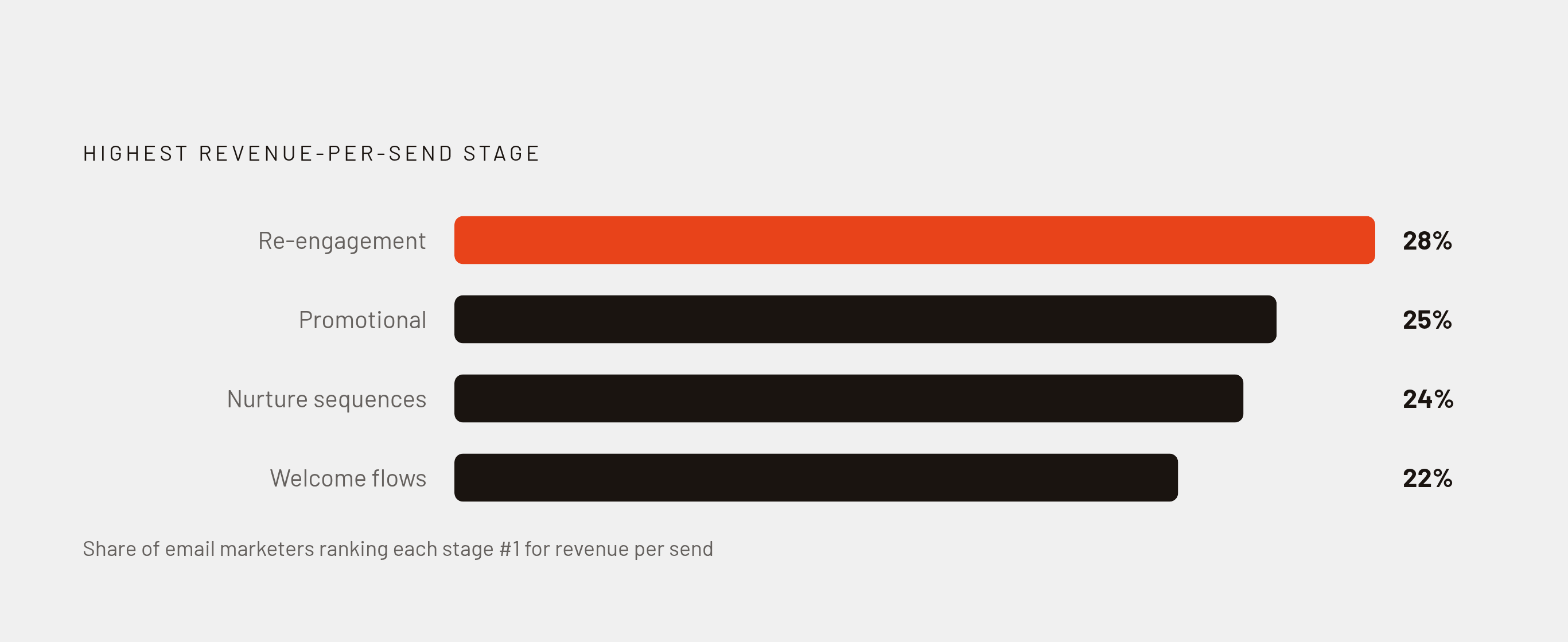
The stakes are higher than the framing usually suggests. DesignRush's Benchmark Survey found that 28% of email marketing professionals identify re-engagement as the funnel stage generating the highest revenue per send, ahead of promotional emails at 25%, nurture sequences at 24%, and welcome flows at 22%. Re-engagement is often the highest-earning segment in the whole program, which makes it a strange place to leave design on autopilot.
Branching inside a re-engagement sequence has to account for a few distinct outcomes. A subscriber who re-opens engagement after the sequence starts should exit the flow and drop back into the standard lifecycle immediately, not keep receiving re-engagement content aimed at a problem that's already solved. A subscriber who clicks but doesn't convert should branch into a value-reinforcement path instead of getting the same generic follow-up. A subscriber who shows no response after the full sequence should exit and get suppressed, because continuing to email a confirmed-inactive address damages deliverability for every other subscriber on the list.
That last point is why the exit condition here is doubled. One exit path is goal completion: the subscriber re-engages. The other is a failure threshold: confirmed inactivity once the full sequence has run its course. The choice between server-side and browser-side instrumentation is a real design constraint, not a minor setting. AI-assisted analysis can also help catch engagement drift before a fixed threshold trips, separating contacts worth re-engaging from ones that are structurally dead. That refinement adds to the structure; it produces the design, and the system still needs a designer to build it. Someone still has to design the trigger, the branch, and the exit; the model just helps decide where the line sits.
Event instrumentation as the prerequisite that sequence design depends on
A behavioral sequence is only as good as the event it's listening for. Suppression deserves its own line item, kept separate from timing. A missing or broken backend event is a data problem, and no amount of clever branching logic fixes a data problem.
The choice between server-side and browser-side instrumentation is a real design constraint, not a minor setting, Sequenzy's research shows. Events fired from the browser can get dropped by ad blockers before they ever reach the platform. Server-side events avoid that failure mode because they don't depend on what's running in the user's browser. MailerToGo's resources lay out a minimal event schema for SaaS onboarding: user ID, email, trial start and end dates, an email-verified flag, activation event status, plan, and relevant property data such as how many team members got invited. That's the floor, not the ceiling, and skipping any of it limits what the sequence can ever branch on.
A reasonable starting point covers the key events tied to real product outcomes: signup, first meaningful action, a specific feature used, a limit reached, a payment failure, each one carrying properties that support real personalization (plan name, project name, percentage of usage consumed). Standard marketing automation tools without a live data connector can't gate a send on real-time user state, full stop. For sequences where sending to the wrong state actively costs money, a trial-expiry nudge landing in the inbox of someone who upgraded yesterday, backend trigger logic is the only architecture that works.
None of this is groundwork to revisit later. The event schema has to get defined before the sequence itself gets designed, because what a sequence can trigger on is strictly limited by what the backend actually tracks.
Measuring whether a trigger was worth building, not just whether the email was opened
Open rate answers one question: did the subject line work. It says nothing about whether the behavioral logic behind the send produced the outcome it was built for, and treating open rate as a proxy for trigger quality is how teams spend months optimizing the wrong thing.
Sequenzy recommends a cleaner test: hold back 5 to 10% of eligible subscribers from the sequence entirely, then compare conversion rates between the triggered group and that holdout. That comparison isolates what the trigger actually caused, rather than what would have happened anyway without it.
Measurement has to happen at two levels, and they answer different questions. At the sequence level, the question is whether the trigger produced its target outcome, activation, upgrade, re-engagement, at a meaningfully higher rate than the holdout achieved on its own. At the email level, the question is whether each conditional branch routed subscribers down the right path; branch performance tells you whether the logic itself is correct.
Exit conditions need their own measurement too. Tracking how subscribers actually leave a sequence, goal completion versus simply timing out, tells you a great deal about whether the design is working as intended. A sequence where most exits are timeouts rather than goal completions is a signal, and not a subtle one, that the trigger, the branching, or the timing needs to be rebuilt from the ground up.
The thread running through all of this is the one that opened the piece: a behavioral sequence is a system of decision points, and each one deserves to be evaluated as a decision, with a counterfactual attached, rather than treated as a content delivery event that either got opened or didn't. The same discipline applies to any program built on algorithmic signals instead of direct human judgment. A metric only means something when it's scored against a real outcome. Absent that, it's a number that feels like insight until someone asks what it actually predicted.
Sources
- Behavioral Email Triggers: How to Capture Intent and Drive Revenue (2026)
- Onboarding Email Sequences: Trial-to-Paid Flows + Code
- Automated Email Sequences: Types, Triggers & Setup
- Email Automation: Flows, Triggers & Sequences
- Email Personalization Patterns: Trigger-Based Dynamic Copy Logic
- Automated Email Nurture Sequence Strategy: Frameworks and Examples (2026) | Sequenzy