AI-Assisted Workflow Branching in HubSpot and Marketo
HubSpot and Marketo diverge on how much autonomy they give AI within workflows.
Marketing automation built its reputation on a simple promise: if a contact does X, the system does Y. That deterministic model still runs most workflows in production today, but AI-assisted branching in HubSpot and Marketo Engage is starting to change what "the system does Y" actually means, and practitioners need to know exactly where that change is real and where it's still marketing copy.
What AI-assisted branching means, the interpretation layer explained
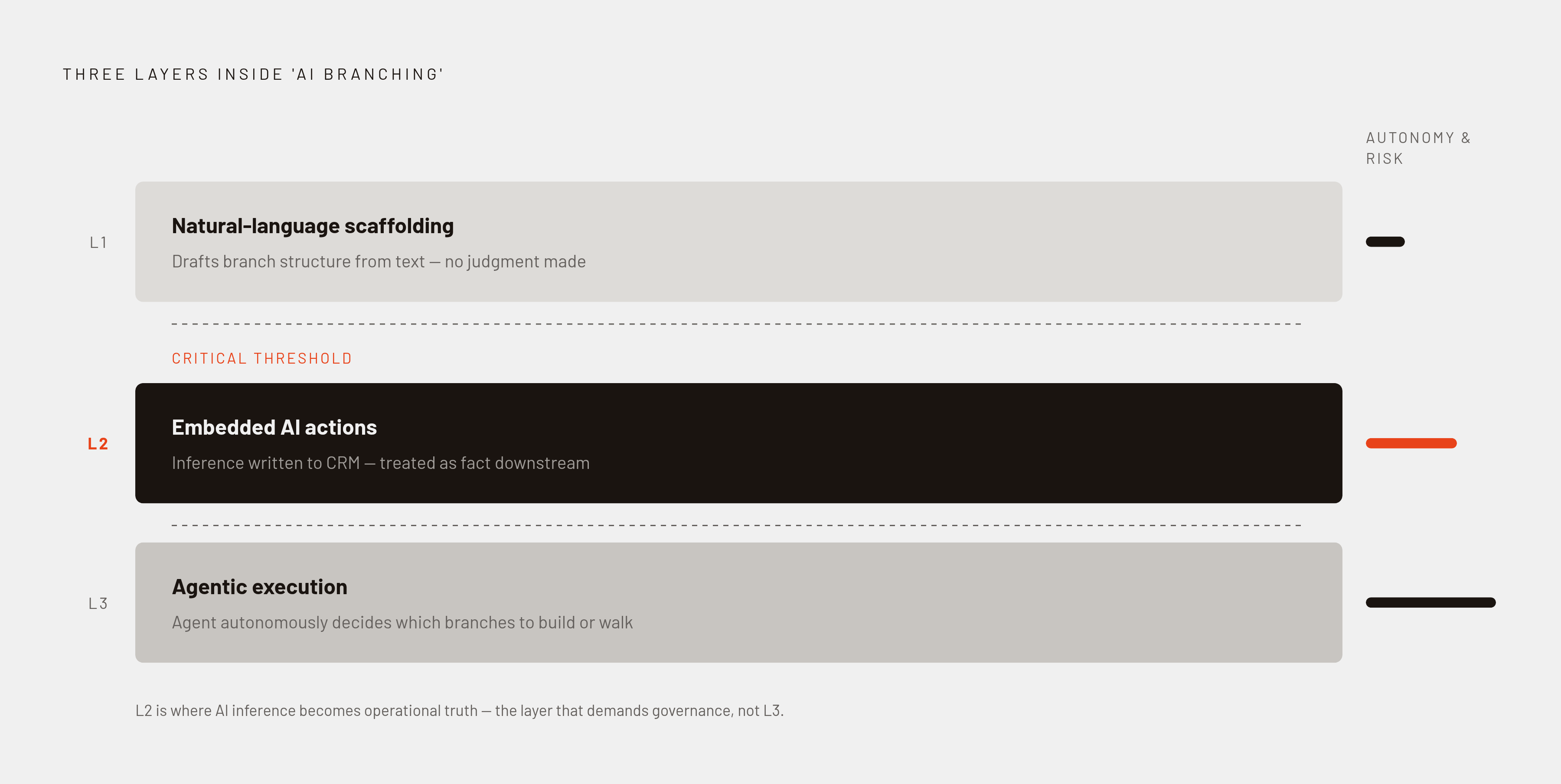
Three distinct capabilities get lumped together under "AI branching," and conflating them causes real confusion when someone's evaluating a platform.
The first is natural-language scaffolding: a person types a plain-English description of a workflow and the system drafts the branch structure for them. The second is embedded AI actions, where an LLM step sits inside a live, running workflow, reads a record, infers something about it, and writes that inference back to a CRM property, which then becomes the thing later steps branch on. The third is agentic execution: an AI agent gets a goal and decides on its own which branches to build or walk down.
A platform can offer the first without the second, or the second without the third. That matters because the operational risk profile of each layer is completely different. Scaffolding just saves someone from clicking through a builder for twenty minutes. Embedded AI actions make a judgment call, from a form submission or a piece of unstructured text, about things like company size, industry, role level, or how likely someone is to hold buying authority, and then it writes an AI-readiness score back into the CRM record. From that point on, downstream logic treats that inferred value the same way it would treat a value a human typed in. That's a meaningfully different animal than a rules-based score checking whether a number crosses a threshold. It's a model reading between the lines and then handing its guess to the rest of the system as fact.
HubSpot's AI branching stack: what Breeze delivers in the workflow builder
HubSpot holds something like 38% of the marketing automation market, which makes it the platform most practitioners will actually touch, so what it ships matters beyond its own customer base.
The natural-language workflow builder covers layer one cleanly. A user can type something like "send a three-email nurture to new leads from the demo-request form, branching on industry," and HubSpot's builder produces a draft: enrollment criteria, branch logic, action steps, all pre-filled and ready for a human to check over.
Breeze covers HubSpot's broader AI push as a name, and it splits into separate pieces. Breeze Assistant (the tool formerly called Breeze Copilot) lives inside the platform and helps draft enrollment criteria in plain language, summarize a contact's timeline, and generate action steps, all with access to CRM data and the account's property schema already built in. Breeze Agents are the more autonomous layer: deployed tools for prospect research, CRM data enrichment, and drafting personalized outreach. Breeze Intelligence sits alongside both as the data enrichment and buyer-intent layer.
What actually shows up as insertable action types inside a live workflow is the real test, and HubSpot has named several: Data Agent: Custom Prompt, Data Agent: Research, Data Agent: Fill Smart Property, Summarize Record, and Run Agent. Those are steps a builder can drag into a workflow today. They're steps a builder can drag into a workflow today.
Marketo Engage's AI direction: agentic architecture and Smart Campaign branching
Adobe's framing at Summit 2026 makes the direction explicit, with Marketo Engage moving from a platform teams operate by hand to one that works alongside the team, and agentic AI is the mechanism Adobe named to get there.
The agent skills Adobe describes target the tedious, repetitive parts of running a marketing operations function: program validation, building Smart Lists, creating programs and Smart Campaigns, enriching imported lead lists, and validating assets before they go live. None of that is glamorous work, but it eats a coordinator's whole afternoon, so automating it has real weight.
The interface Adobe has described centers on natural-language interaction, with agents handling day-to-day operational work on behalf of the team. Adobe has pointed to grounding AI responses in official documentation as part of its approach to making the system trustworthy for operational use. The architecture Adobe has laid out for 2026 rests on three pieces working together: native agents, MCP (Model Context Protocol) connectivity, and callable agents that a Smart Campaign can trigger directly. Those three components are what "agentic" means in Marketo's case.
Branching expressiveness, scoring architecture, and AI autonomy
Branching logic is where the two platforms have always differed, and AI layered on top hasn't erased that gap. HubSpot's workflow builder favors visual simplicity and speed of setup, but its conditional logic doesn't stretch as far as Marketo's. Marketo's Smart Campaigns and Engagement Programs support multi-step, nested workflows with conditional branching and date-based triggers, and that branching depth remains a meaningful differentiator for complex B2B use cases going into 2026.
Scoring architecture follows the same pattern. HubSpot ties scoring models to specific object types, which limits its ability to hold ICP fit as a signal fully separate from behavioral engagement. Marketo allows unlimited custom score fields, so something like Demographic Score and Behavior Score can exist side by side and compound independently rather than getting collapsed into one number.
AI autonomy is the newer axis of difference. HubSpot's AI scaffolds and assists within surfaces the platform already exposes, drafting workflows for a human to review while AI Audit Cards give visibility into what the system decided and why. Marketo's agentic model asks less of the human up front, a person states an objective and the system plans the execution, which is a more autonomous posture and one that demands more operational governance to run safely. Campaign organization reflects the same underlying philosophy: HubSpot and Marketo take different structural approaches to campaign organization, reflecting the same underlying philosophical differences visible in their branching and scoring architectures.
Real AI-powered HubSpot workflows: grounded examples from production
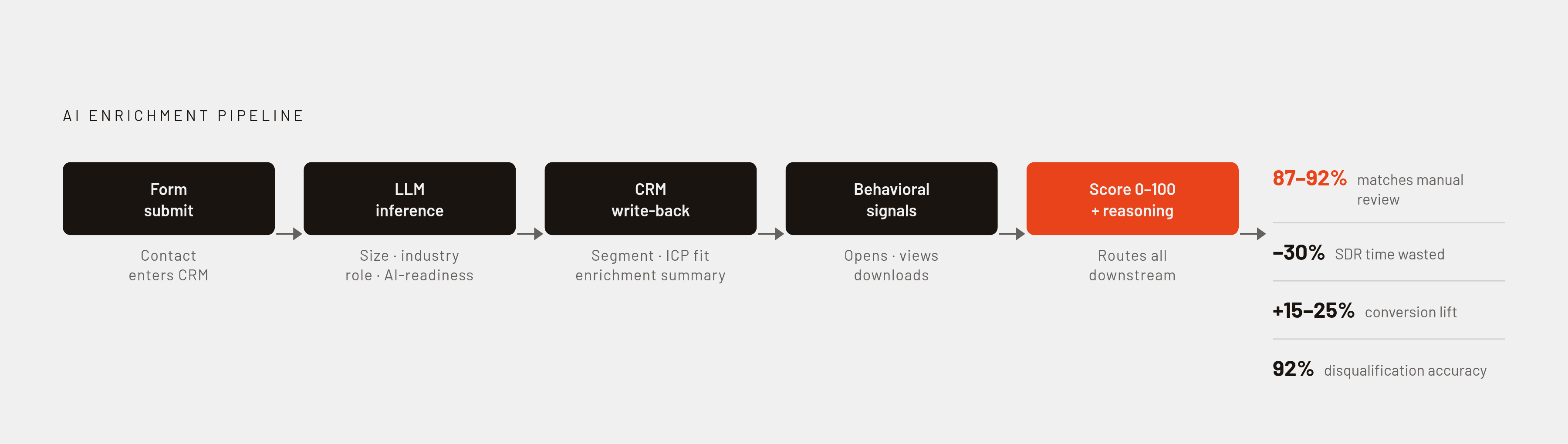
Enrichment workflows are the clearest example of the interpretation layer at work. A new contact fills out a form, an LLM step reads public signals and infers company size, industry, role level, buying authority, and an AI-readiness score on a 1-to-5 scale, then writes all of it back to dedicated CRM fields for segment, role, buying authority, ICP fit score, and an enrichment summary. Measured against manual review, that inference is 87 to 92% agreement, and teams running it report catching disqualified leads early enough to cut wasted SDR time by roughly 30%.
Qualification scoring builds on top of that enrichment layer. It combines the inferred fields with behavioral signals, email opens, page views, content downloads, into a single 0-to-100 qualification score, plus a one-line field explaining the reasoning behind the number. Teams that added AI scoring on top of an existing lead qualification process saw conversion improve 15 to 25%, and manual checks confirmed AI-flagged disqualifications at 92% accuracy. Don't auto-disqualify a lead off the AI score alone. Reps trust the score more, not less, when they can see the one-line reasoning attached to it, which says something about how sales teams actually adopt AI output.
Follow-up email drafts pulled from call transcripts show a smaller but real lift, a 12% improvement in reply rate tied to faster turnaround and language that mirrors how the prospect actually talked on the call. The hard rule attached to this one doesn't bend: human review before send, every time, never auto-send. A realistic pace for teams doing this seriously runs 5 to 10 new workflows a quarter, and the value compounds as enrichment data builds up across the CRM over time rather than delivering a one-time bump.
Where human oversight remains essential regardless of platform
An AI action that writes a wrong inference into a CRM field doesn't just make one mistake. That field drives routing for every contact it touches downstream, so the error multiplies quietly across the database before anyone notices something's off.
A CRM's structural answer to that risk is a visible record of what the AI decided and on what basis. Marketo's answer is documentation-grounded responses tied to citations. Neither one removes the need for someone to periodically sit down and check the output for quality, because both are transparency tools, not correctness guarantees.
Calibration isn't a setup task that's done once and forgotten. ICP-fit scores need retuning as a company's actual ideal customer profile shifts, and early LLM prompts tend to overcategorize, sorting things too aggressively into buckets, so catching that pattern early saves a lot of downstream cleanup. None of this works, either, if the underlying data model is thin. AI research tools are only as good as the object relationships and property definitions they're given to work with. A messy data model doesn't cause the system to fail quietly; it hallucinates workflow logic that looks plausible and isn't. Getting the architecture right first isn't optional, no matter how good the AI layer on top of it claims to be.
How AI systems evaluate businesses
AI assistants have become an early stop for people researching purchasing decisions, synthesizing options and answering with a tone of authority that reads as settled fact.
That creates a problem where the first three or four brands an AI assistant surfaces become the entire consideration set. A marketing director exploring analytics platforms might open a conversation with an AI assistant and ask for an overview of the leading options. Whatever three or four brands show up in that first answer become the set the director actually considers, and a company left out of that list starts the sales conversation already behind, regardless of how good its product actually is.
Even so, AI doesn't replace the human conversation, it just moves earlier in the funnel. 69% of B2B buyers say they'd rather validate an AI-generated recommendation with a sales rep before committing to a final decision. The AI shapes who gets into the room, even though a person still closes the deal. And the content doing that shaping mostly isn't coming from company websites at all: 85% of brand mentions inside AI outputs trace back to third-party pages rather than owned domains. A company's own site can say everything right, but if the third-party signal around it is thin, that carefully built workflow automation content strategy is talking mostly to itself.